You can absolutely add another pet to a stay or walk. In this article, we'll cover:
Adding a new pet profile
Adding a pet to a pending request (before booking)
Adding a pet to an upcoming request (after booking)
Adding a new pet profile
Before you can add another pet to a booking, you’ll need to create a new profile for the pet if you haven’t already. Here's how:
1. Navigate to your Dashboard or Profile by selecting your name in the upper right corner of the screen.
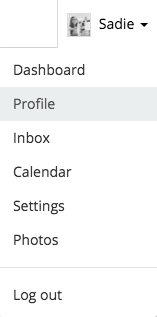
2. Select Add a new pet from your dashboard or profile.
3. Fill out your pet’s profile information. Make sure you add photos!
Rover Tip: The more detailed your pet's profile is, the better your Rover sitter or dog walker will understand your pet's needs—that means a better booking for everyone.
4. Select Save. You’re all set!
Adding a pet to a pending request (before booking)
1. Navigate to your Inbox by selecting the conversation icon in the upper right corner of your screen.
2. Under the pending requests tab select the correct conversation.
Locate the gray request details box and select Modify request.
3. Select the checkbox next to the pet you wish to add.
4. Select Save. The price will automatically adjust to reflect any changes.
5. Select Book It Now. You're all set!
Adding a pet to an upcoming request (after booking)
If you need to add a pet to the service after you already confirmed the booking, contact your sitter via Rover Message to see if they can accommodate your request. If your sitter agrees, they can modify the booking from their account.
Once your sitter makes the changes, you'll need to re-confirm the booking. Learn how to do that here.